Saurashtra University
B.Ed. Sem 3
CC5 Computer
Dec 2020 Paper Solution


Saurashtra University
B.Ed. Sem 3
CC5 Computer
Dec 2020 Paper Solution
B.Ed. CC5 કમ્પ્યુટરના પ્રશ્નો
1. NAD નું ફૂલ ફોર્મ શુ છે.
National Academic Depository
~~~~~~~~~~~~~~~~~~~~~~~~~~~~~~
2. ઓપન શૈક્ષણિક સંસાધનોનો રાષ્ટ્રીય ભંડાર એટલે..
NREOR
~~~~~~~~~~~~~~~~~~~~~~~~~~~~~~
3. NREOR નું ફુલફોર્મ શું છે ?
National Repository of Open Educational Resources
~~~~~~~~~~~~~~~~~~~~~~~~~~~~~~
4. સ્વંયમ પ્રભા dth પર કુલ કેટલી એજ્યુકેશન ચેનલ આવે છે.
34
~~~~~~~~~~~~~~~~~~~~~~~~~~~~~~
5. Swayam એટલે
Study Webs of Active-Learning for Young Aspiring Minds
~~~~~~~~~~~~~~~~~~~~~~~~~~~~~~
6. DIKSHA નું ફુલફોર્મ શું છે ?
Digital Infrastructure for Knowledge Sharing
~~~~~~~~~~~~~~~~~~~~~~~~~~~~~~
7. Open shot એ...
Video editor છે.
~~~~~~~~~~~~~~~~~~~~~~~~~~~~~~
8. Loom એ
સ્ક્રિન રેકોર્ડર સોફ્ટવેર છે.
~~~~~~~~~~~~~~~~~~~~~~~~~~~~~~
9. OBS નું પૂરું નામ શું છે ?
Open Broadcaster Software
~~~~~~~~~~~~~~~~~~~~~~~~~~~~~~
10. OBS Studio
video recording સોફ્ટવેર છે.
live streaming સોફ્ટવેર છે.
ઉપરના બન્ને
~~~~~~~~~~~~~~~~~~~~~~~~~~~~~~
11. Google Drive કેટલી ફ્રી કલાઉડ સ્ટોરેજ આપે છે ?
15 GB
~~~~~~~~~~~~~~~~~~~~~~~~~~~~~~
12. NCERT નું પૂરું નામ આપો ?
National Council of Educational Research and Training
~~~~~~~~~~~~~~~~~~~~~~~~~~~~~~
13. Google Classroom માટે શું જરૂરી છે ?
Google account
~~~~~~~~~~~~~~~~~~~~~~~~~~~~~~
14. JamBoard શુ છે ?
G-suit છે.
~~~~~~~~~~~~~~~~~~~~~~~~~~~~~~
15. Google Calander માં તમે ...
ઉપરના તમામ કાર્યો
~~~~~~~~~~~~~~~~~~~~~~~~~~~~~~
16. નીચે આપેલ વેબીનારના પ્લેટફોર્મ છે.
ઉપરોક્ત તમામ
~~~~~~~~~~~~~~~~~~~~~~~~~~~~~~
17. ઓનલાઈન મૂલ્યાંકન માટે ...
ઉપરોક્ત તમામ
~~~~~~~~~~~~~~~~~~~~~~~~~~~~~~
18. QR નું પૂરું નામ શું છે ?
Quick Response
~~~~~~~~~~~~~~~~~~~~~~~~~~~~~~
19. Google Classroom માં ક્યુ સાહિત્ય મૂકી શકો છો ?
ઉપરોક્ત તમામ
~~~~~~~~~~~~~~~~~~~~~~~~~~~~~~
20. ઓનલાઈન ક્લાસનું માધ્યમ જણાવો ?
Google Meet
~~~~~~~~~~~~~~~~~~~~~~~~~~~~~~
21. હાજરી પત્રક, ગ્રેડ બુક બનાવવા માટે ઉપયોગી છે.
Google Sheet
~~~~~~~~~~~~~~~~~~~~~~~~~~~~~~
22. ડીલીટ(Delete) કરેલી વસ્તુ કયાં સ્ટોર થાય છે?
Recycle bin
~~~~~~~~~~~~~~~~~~~~~~~~~~~~~~
23. અક્ષરો બોલ્ડ(Bold) કરવાની શોર્ટકટ કી કઇ છે?
Ctrl + B
~~~~~~~~~~~~~~~~~~~~~~~~~~~~~~
24. Ms Word કઇ રીતે રન કરાય છે?
run ~ winword
~~~~~~~~~~~~~~~~~~~~~~~~~~~~~~
25. POST નુ પુરુ નામ શુ છે?
Power On Self Test
~~~~~~~~~~~~~~~~~~~~~~~~~~~~~~
26. વિજાણુ ટપાલ એટલે શું ?
~~~~~~~~~~~~~~~~~~~~~~~~~~~~~~
27. નીચેનામાથી એક સુવિધા એકસેલ એપ્લીકેશનમાં જોવા મળતી નથી.
મેઈલ મર્જ
~~~~~~~~~~~~~~~~~~~~~~~~~~~~~~
28. ક્યાં પ્રકારની મેમરીને ફક્ત વાંચી શકાય છે ?
ROM
~~~~~~~~~~~~~~~~~~~~~~~~~~~~~~
29. કિબોર્ડની પ્રથમ લાઇનમાં ડાબી બાજુથી જમણી બાજુની કી નો ક્રમ કયો હોય છે
QWERT
~~~~~~~~~~~~~~~~~~~~~~~~~~~~~~
30. કમ્પ્યુટર બંધ કરવા માટેની શોર્ટકટ કી કઈ છે ?
Alt + F4
~~~~~~~~~~~~~~~~~~~~~~~~~~~~~~
31. ક્યા પ્રિન્ટરમાં ટોનરનો ઉપયોગ થાય છે ?
લેઝર પ્રિન્ટર
~~~~~~~~~~~~~~~~~~~~~~~~~~~~~~
32. ઓપન સોર્સ ઓપરેટિંગ સિસ્ટમ છે.
ઉબન્ટુ
~~~~~~~~~~~~~~~~~~~~~~~~~~~~~~
33. M S Power point મા સ્લાઇડ શો શરૂ કરવા માટેની ફંક્શન કી કઈ છે ?
F5
~~~~~~~~~~~~~~~~~~~~~~~~~~~~~~
34. LAN નું પૂરું નામ
Local area network
~~~~~~~~~~~~~~~~~~~~~~~~~~~~~~
35. પ્રથમ ઇલેકંટ્રોનિક કોમ્પ્યટુર નુ નામ શુ હતું ?
Eniac
~~~~~~~~~~~~~~~~~~~~~~~~~~~~~~
36. કમ્પ્યુટરમાં વપરાતા બધા Physical Parts અને devices ને શું કહેછે?
Hardware
~~~~~~~~~~~~~~~~~~~~~~~~~~~~~~
37. IC નુ પૂરું નામ શુછે?
Integrated Circuit
~~~~~~~~~~~~~~~~~~~~~~~~~~~~~~
38. CU નુ પૂરું નામ શુછે?
Control unit
~~~~~~~~~~~~~~~~~~~~~~~~~~~~~~
39. માઉસ નું ......... બટન Ok નું કામ કરે છે ?
ડાબું
~~~~~~~~~~~~~~~~~~~~~~~~~~~~~~
40. માઉસના ડાબા બટનને એક વખત પ્રેસ કરવાની પ્રક્રિયાને શુ કહે છે?
ક્લિકિંગ
~~~~~~~~~~~~~~~~~~~~~~~~~~~~~~
સૌરાષ્ટ્ર યુનિવર્સિટી
B.Ed. Sem 3 CC5
આદર્શ પ્રશ્નપત્ર 2
[કુલ 70 ગુણ]
પ્રશ્ન 1. નીચે આપેલા 40 બહુ વિકલ્પી પ્રશ્નો પૈકી કોઈપણ 20 ના ઉત્તર આપવા. (પ્રત્યેકના 1.5 ગુણ) [30 ગુણ]
અહીં ક્લિક કરી ટેસ્ટ આપો.
પ્રશ્ન 2 નીચે આપેલ 16 પ્રશ્નોમાંથી કોઈપણ 8 પ્રશ્નોના જવાબ મુદાસર લખો. (પ્રત્યેકના 5 ગુણ) [40 ગુણ]
1. કીબોર્ડની ઉપરની લાઈનમાં કુલ કેટલી ફંક્શન કી આવેલી હોય છે ?
~~~~
12
2. નીચેનામાંથી ઇનપુટ ડીવાઇઝ નથી ?
સ્પીકર
~~~~
3. ગાણિતિક અને તાર્કિક એકમનું ટૂંકું નામ શું છે ?
ALU
~~~~
4. કટ(Cut) માટેની શોર્ટકટ કી કઇ છે?
ctrl + x
~~~~
5. એક્સેલ(Excel) શીટમાં પહેલી કોલમ(Column) અને પહેલી રો(Row)નું એડ્રેસ શું હોય છે?
A1
~~~~
6. કોઇ પણ પ્રોગ્રામ મીનીમાઇઝ કરતા તે ક્યાં જોવા મળે છે?
task bar
~~~~
7. સ્પેલીંગ ચેક કરવાની શોર્ટકટ કી કઇ છે?
F7
~~~~
8. વિન્ડોની સ્ક્રીનને શુ કહેવામાં આવે છે?
ડેસ્કટોપ
~~~~
9. Ms Office 2007 માં Word ફાઇલનું એક્ષટેન્શન શુ હોય છે?
.docx
~~~~
10. Windows એ કયા પ્રકારી ચાલક પધ્ધતિ કહેવામાં આવે છે?
GUI
~~~~
11. કયો ઓપ્શન આપમેળે જ સામાન્ય ટાઇપીંગ અને સ્પેલીંગમાં થતી ભુલો સુધારે છે?
Auto Correct
~~~~
12. જે સેલમાં કર્સર(Cursor) હોય તે સેલને કયો સેલ કહે છે?
એક્ટિવ સેલ
~~~~
13. લખાણમાંથી કોઇ ચોક્કસ શબ્દ શોધવા કયા વિકલ્પનો ઉપયોગ થાય છે?
find
~~~~
14. 1024 KB = ?
1 MB
~~~~
15. CD માં ડેટા સંગ્રહ કરવાની કેપેસીટી કેટલી હોય છે?
700 mb
~~~~
16. Caps Lock, Num Lockઆ બધાને શુ કહેવાય છે?
ટોગલ કી
~~~~
17. Excel 2007 માં તૈયાર કરેલ ફાઇલનું એક્ષટેન્શન કયુ હોય છે?
.xlsx
~~~~
18. Power point 2007 માં તૈયાર કરેલ ફાઇલનું એક્ષટેન્શન કયુ હોય છે?
.pptx
~~~~
19. ફાઇલમાં સૌથી ઉપરની લાઇન શુ દર્શાવે છે?
ટાઇટલ
~~~~
20. રો(Row) અને કોલમ(Column)થી જે બોક્સ બને તેને શુ કહેવાય છે?
Cell
~~~~
21. કોમ્પ્યુટરમાં Start બટન કયા બારમાં આવેલ છે?
ટાસ્ક બાર
~~~~
22. ઓનલાઈન એજ્યુકેશન માટે કઈ ગૂગલ એપ્સ વધુ ઉપયોગી છે ?
ગૂગલ કલાસરૂમ
~~~~
23. ઈન્ટરનેટ પર સેમિનાર યોજવા માટે.... ઉપયોગ થાય છે.
વેબીનાર
~~~~
24. ગુગલ કલાસરૂમ માટે નીચેનામાંથી શું પસંદ કરશો ?
classroom.google.com
~~~~
25. Google Drive એ....
કલાઉડ સ્ટોરેજ છે.
~~~~
26. ઓનલાઈન માઈક્રોસોફ્ટ વર્ડ જેવી ફાઈલ બનાવવા માટે..... નો ઉપયોગ થાય છે.
Google Docs
~~~~
27. ઓનલાઈન માઈક્રોસોફ્ટ એક્સેલ જેવી ફાઈલ બનાવવા માટે..... નો ઉપયોગ થાય છે.
Google Sheet
~~~~
28. ઓનલાઈન માઈક્રોસોફ્ટ પાવરપોઇન્ટ જેવી ફાઈલ બનાવવા માટે..... નો ઉપયોગ થાય છે.
Google Slide
~~~~
29. નીચેનામાંથી ઓનલાઈન મૂલ્યાંકન શક્ય નથી ?
ટ્વીટર ટેસ્ટ
~~~~
30. *શિક્ષિત ભારત ઉન્નત ભારત* આ સ્લોગન કોનું છે.
SWAYAM
~~~~
31. *learning on the go* આ સ્લોગન કોનું છે.
E-Pathshala
~~~~
32. *platform for teachers* આ શબ્દો ક્યાં જોવા મળે છે.
DIKSHA
~~~~
33. આ એક ડિજિટલ લોકર છે.
NAD
~~~~
34. એન.સી.ઇ.આર.ટી દ્વારા શરૂ કરેલ છે.
E-Pathshala
~~~~
35. સ્વંયમ પ્રભા......
ફ્રી dth ચેનલ છે.
~~~~
36. રાષ્ટ્રીય શૈક્ષણિક થાપણ તરીકે ઓળખાય છે.
nad
~~~~
37. નીચે આપેલ રેકોર્ડિંગ ટુલ્સનું ઉદાહરણ નથી.
twitter live
~~~~
38. વિડીઓ એડીટીંગ માટે ઉપયોગી છે.
openshot
~~~~
39. સ્ક્રીન રેકોર્ડ માટે..... ઉપયોગી છે.
LOOM
~~~~
40. નીચેનામાંથી સ્ક્રીન રેકોર્ડ થઈ શકે નહી..
Google Recorer
IP means Internet Protocol.
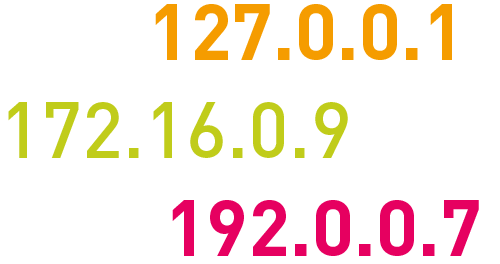
You may have seen the statistics above somewhere. That is the address.
An IP address (internet protocol address) is a numerical representation that uniquely identifies a specific interface on the network.
An Internet Protocol address (IP address) is a numerical label assigned to each device connected to a computer network that uses the Internet Protocol for communication.
An IP address serves two main functions: host or network interface identification and location addressing.
IP address is an address having information about how to reach a specific host, especially outside the LAN.
Network administrators assign an IP address to each device connected to a network.
Such assignments may be on a static (fixed or permanent) or dynamic basis, depending on network practices and software features.
IP address stands for internet protocol address; it is an identifying number that is associated with a specific computer or computer network.
When connected to the internet, the IP address allows the computers to send and receive information.
IP address is a fascinating product of modern computer technology designed to allow one computer or other device to communicate with another via the Internet.
The unique 32-bit number that identifies a computer on the Internet or some other Internet Protocol network is called IP Address.
IP addresses can be either static or dynamic. Static IP addresses never change.
Dynamic IP addresses are temporary and are assigned each time a computer accesses the Internet.
IP addressing are in the form of xyz.xyz.xyz.xyz where xyz must be a number from 0 to 255. This address is known as an IP address.
Internet Protocol uses a set of rules to send and receive messages points at the internet address level.
Without Internet Protocol nothing can work on the Internet.
Therefore, it is necessary to update Internet Protocols, so that communication on the internet is always fast and efficient.
IP addressing system and transmission control system together handle all the data transfers.
To be able to connect to any given computer via the internet user can need to know its IP address, but because numbers are hard to remember, domain names are used instead.
An IP address allows computers to send and receive data over the internet. Most IP addresses are purely numerical, but as internet usage grows, letters have been added to some addresses.
There are four different types of IP addresses: public, private, static, and dynamic.
While the public and private are indicative of the location of the network—private being used inside a network while the public is used outside of a network—static and dynamic indicate permanency.
A static IP address is one that was manually created, as opposed to having been assigned.
A static address also does not change, whereas a dynamic IP address has been assigned by a Dynamic Host Configuration Protocol (DHCP) server and is subject to change.
Dynamic IP addresses are the most common type of internet protocol addresses. Dynamic IP addresses are only active for a certain amount of time, after which they expire.
The computer will either automatically request a new lease, or the computer may receive a new IP address.
An IP address can be compared to a Social Security Number (SSN) since each one is completely unique to the computer or user it is assigned to.
The creation of these numbers allows routers to identify where they are sending information on the internet.
They also make sure that the correct devices are receiving what is being sent. Much like the post office needs a mailing address to deliver a package, a router needs an IP address to deliver to the web address requested.
Unicast addressing is the most common concept of an IP address in the Unicast addressing method.
It is available in both IPv4 and IPv6.
This IP address method refers to a single sender/receiver.
It can be used for both sending and receiving the data.
In most cases, a Unicast address is associated with a single device or host, but a device or host that may have more than one unicast address.
Broadcasting addressing is another addressing method available in IPv4.
It allows you to manage data to all destinations on a network with a single transmission operation.
The IP address 255.255.255.255 is mostly used for network broadcast.
Moreover, limited directed-broadcast uses the all-ones host address with the network prefix.
IPv6 does not provide any implementation and any broadcast addressing.
It replaces it with multicast to the specially defined all-nodes of the multicast address.
Multicast IP addresses are used mainly for one-to-many communication. Multicast messages are mostly sent to the IP multicast group address.
In this, routers forward copies of the packet out to every interface with hosts subscribed to that specific group address.
Only the hosts that require receiving the message will process the packets. All other hosts on that LAN will discard them.
In anycast addressing the data, the stream is not transmitted to all receivers. However, just the one that the router decides is closest to the network.
This IP addressing comes as a built-in feature of IPv6. In IPv4, it is implemented by using the Border Gateway Protocol by using the shortest-path metric.
This method is widely used for global load balancing and is also used in distributed DNS systems.
| Type of IP Address | Description |
| Public IP | A public IP address is an address where one primary address is associated with your whole network. |
| Private IP | A private IP address is a unique IP number assigned to every device that connects to your home internet network. |
| Dynamic IP | Dynamic IP addresses always keep changing. It is temporary and are allocated to a device every time it connects to the web. |
| Static IP | Static IP address never changes, but it can be altered as part of routine network administration. |
| Shared IP | The IP address is not unique and it is shared with other websites. |
| Dedicated IP | Dedicated IP address is assigned uniquely to each website. |
યુનિવર્સિટીમાં B.ed CC5 તેમજ અન્ય સ્નાતક અભ્યાસ ક્રમ તેમજ CCC , વિવિધ નોકરીઓ માટેની સ્પર્ધાત્મક પરીક્ષાઓમાં પુછાતા કમ્પ્યુટરને લગતા પ્રશ્નોની યાદી

Some of the most widely used Internet connections are described below.
The requirements for connecting to the Internet depends on the type of Internet connection you have. There are basically two types of Internet connections : Dial-up connection and Leased line connection.
(A). Dial-up Connection :-
Dial-up connections require users to link their phone line to a computer in order to access the Internet.
Dial-up Internet access is a form of Internet access that uses the facilities of the public switched telephone network (PSTN) to establish a connection to an Internet service provider (ISP) by dialing a telephone number on a conventional telephone line.
Dial-up connections use modems to decode audio signals into data to send to a router or computer, and to encode signals from the latter two devices to send to another modem.
Briefly on the main points
(2) Serial Line Internet Protocol (SLIP)
Dialup connections can be classified as either terminal based or network-based.
A terminal-based dial up connection involves the use of special terminal emulation software, which makes the local system a terminal of the remote machine.
In a network-based dial up connection, special networking software transform the local machine into a networked node and provides it with the same capabilities of any other networked node exactly as if it were directly connected to a LAN.
The performance of dial up networking is relatively poor due to the limitations of traditional modem technology.
Many home users are currently replacing their dial up service with high-speed broadband technologies that operate at much higher speeds.
Creating a Dial-up networking connection:-
Step 1. click start then computer panel.
Step 2. click network and internal then. Network and sharing center.
Step 3. click on the set up a new connection or network option.
Step 4. click on connect to the internet.
Step 5. click dial-up.
Step 6. Enter the service provider’s dial-up phone number in the dial-up phone number field. In the user name field type in your full email address allotted by the service provider. In the password field type in your password. For connection name, name your connection. Click the connect option to dial your new dial-up connection.
Step 7. Once connected you will see a THE CONNECTION TO THE INTERNET IS READY TO USE

(B). Leased Line Connection :-

A leased line is a dedicated fixed-bandwidth data connection.
The word 'leased' refers to the connection rented by the Internet Service Provider directly to a business. A leased line needs to be symmetrical, uncontended and point to point.
A leased line is a private telecommunications circuit between two or more locations provided according to a commercial contract.
Leased lines can be used for telephone, Internet, or other data communication services.
An Internet leased line is a premium Internet connectivity product, normally delivered over fiber, which provides uncontended, symmetrical bandwidth with full-duplex traffic.
It is also known as an Ethernet leased line, dedicated line, data circuit or private line.
Briefly on the main points of Leased Line
Generally, the leased line used for-
Advantages of leased line :~
Leased lines usually have these distinctive characteristics:
Symmetrical
Leased lines must be symmetrical. This means they have the same upload and download speed.
Uncontended
Leased lines are – by definition – uncontended connections, not shared with other users.
They connect two points together, eg the ISP with a business location.
We’re all familiar with a standard internet connection. We get home, connect our phone, tablet or TV and start to stream, browse or download content.
But when everyone in your area is doing the same thing, this can slow down the connection. This is because these connections are “contended” – bandwidth is shared amongst the users of a local area.
With a dedicated leased line, the bandwidth you require has been given to you and only you have access to it.
This means that your connection won’t be hampered by peak times throughout the day.
If you own or run your own business, you’ll already be aware of the impact slow internet connections can have. Downloading or sending large files, VoIP conference calls – all can be interrupted by a poor internet connection.
Today the majority of businesses are dependent on the internet. With a strong internet connection, SMEs are exploring rather creating a world of opportunities for them.
When it comes to a secure and strong connection, leased internet deserves some words.
Which is better Dial-up broadband or leased line?
It depends on the criteria and budget. If you need a high-speed connection with hardcore security and do not want to share the connection, choosing a leased line will be the best choice for you.
A lot of corporate offices are taking the help of this connection to enhance their work process and security.
On the other hand, broadband is not a dedicated connection. It is a variable bandwidth and asymmetric i.e. it offers faster download than uploads. And here you may have to share the connection with others.
If budget is not your main concern, you can go for a leased line.


